Network : A network can be defined as two or more computers connected together in such a way that they can share resources.The purpose of a network is to share resources.A network is simply a collection of computers or other hardware devices that are connected together, either physically or logically, using special hardware and software, to allow them to exchange information and cooperate. Networking is the term that describes the processes involved in designing, implementing, upgrading, managing and otherwise working with networks and network technologies.
A computer network consists of a collection of computers, printers and other
equipment that is connected together so that they can communicate with
each other.
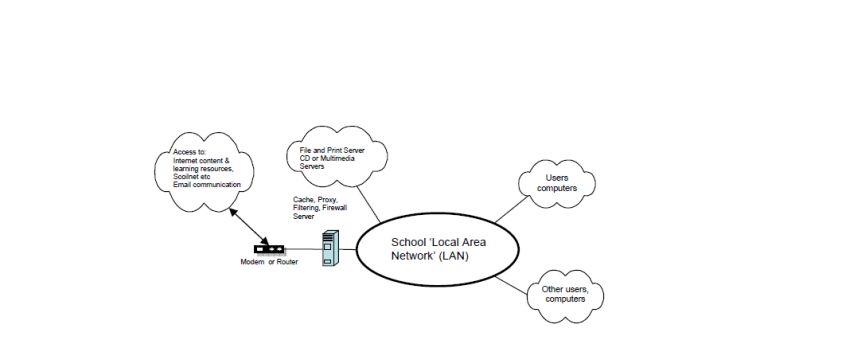
Fig 1: Representation of Network in a school. Source : Google
Broadly speaking, there are two types of network configuration, peer-to-peer
networks and client/server networks.
Peer-to-peer networks are more commonly implemented where less then
ten computers are involved and where strict security is not necessary. All
computers have the same status, hence the term ‘peer’, and they
communicate with each other on an equal footing. Files, such as word
processing or spreadsheet documents, can be shared across the network and
all the computers on the network can share devices, such as printers or
scanners, which are connected to any one computer.
Client/server networks
are more suitable for larger networks. A central computer, or ‘server’, acts as the storage location for files and applications shared on the network. Usually the server is a higher than average performance computer. The server also controls the network access of the other computers which are referred to as the ‘client’ computers. Typically, teachers and students in a school will use the client computers for their work and only the network administrator (usually a designated staff member) will have access rights to the server.
Network Classifications
Local Area Networks (LANs) :
A local area network (LAN) is a computer network covering a small geographic area, like a home, office, or group of buildings
Wide Area Networks (WANs) :
Wide Area Network (WAN) is a computer network that covers a broad area (i.e., any network whose communications links cross metropolitan, regional, or national boundaries). Or, less formally, a network that uses routers and public communications links .The largest and most well-known example of a WAN is the Internet.
WANs are used to connect LANs and other types of networks together, so that users and computers in one location can communicate with users and computers in other locations
Metropolitan Area Network (MAN) :
A metropolitan area network (MAN) is a network that interconnects users with computer resources in a geographic area or region larger than that covered by even a large local area network (LAN) but smaller than the area covered by a wide area network (WAN). The term is applied to the interconnection of networks in a city into a single larger network (which may then also offer efficient connection to a wide area network). It is also used to mean the interconnection of several local area networks by bridging them with backbone lines. The latter usage is also sometimes referred to as a campus network.
Advantages of Networking
1. Connectivity and Communication
2. Data Sharing
3. Hardware Sharing
4. Internet Access
5. Internet Access Sharing
6. Data Security and Management
7. Performance Enhancement and Balancing
8. Entertainment
Disadvantages of Networking
1. Network Hardware, Software and Setup Costs
2. Hardware and Software Management and Administration Costs
3. Undesirable Sharing
4. Illegal or Undesirable Behavior
5. Data Security Concerns
Intranet and Internet
Intranet: An intranet is a private network that is contained within an enterprise. It may consist of many interlinked local area networks and also use leased lines in the wide area network.
An intranet uses TCP/IP, HTTP, and other Internet protocols and in general looks like a private version of the Internet. With tunneling, companies can send private messages through the public network, using the public network with special encryption/decryption and other security safeguards to connect one part of their intranet to another.
Internet: is a worldwide system of computer networks – a network of networks in which users at any one computer can, if they have permission, get information from any other computer (and sometimes talk directly to users at other computers).
Client and Server Computer role in Networking
Server computer is a core component of the network, providing a link to the resources necessary to perform any task. A server computer provides a link to the resources necessary to perform any task. The link it provides could be to a resource existing on the server itself or a resource on a client computer.
Client computers normally request and receive information over the network client. Client computers also depends primarily on the central server for processing activities.
Network Topology
A topology is a way of “laying out” the network. Topologies can be either physical or logical.
Physical topologies describe how the cables are run.
Logical topologies describe how the network messages travel
The types of topologies are :
1. Bus (can be both logical and physical)
2. Star (physical only)
3. Ring (can be both logical and physical)
4. Mesh (can be both logical and physical)
- Bus :
- A bus is the simplest physical topology. It consists of a single cable that runs to every workstation.
- This topology uses the least amount of cabling, but also covers the shortest amount of distance.
- Each computer shares the same data and address path. With a logical bus topology, messages pass through the trunk, and each workstation checks to see if the message is addressed to itself. If the address of the message matches the workstation’s address, the network adapter copies the message to the card’s on-board memory.
- It is difficult to add a workstation.
- If any one of the cables breaks, the entire network is disrupted. Therefore, it is very expensive to maintain.
- Star :
- A physical star topology branches each network device off a central device called a hub, making it very easy to add a new workstation.
- Also, if any workstation goes down it does not affect the entire network. (But, as you might expect, if the central device goes down, the entire network goes down.)
- Some types of Ethernet and ARCNet use a physical star topology.
- Ring :
- Each computer connects to two other computers, joining them in a circle creating a unidirectional path where messages move workstation to workstation.
- Each entity participating in the ring reads a message, then regenerates it and hands it to its neighbor on a different network cable.
- The ring makes it difficult to add new computers.
- Unlike a star topology network, the ring topology network will go down if one entity is removed from the ring.
- Physical ring topology systems don’t exist much anymore, mainly because the hardware involved was fairly expensive and the fault tolerance was very low.
- Mesh :
- The mesh topology is the simplest logical topology in terms of data flow, but it is the most complex in terms of physical design.
- In this physical topology, each device is connected to every other device
- This topology is rarely found in LANs, mainly because of the complexity of the cabling.
- Because of its design, the physical mesh topology is very expensive to install and maintain.
- Cables must be run from each device to every other device. The advantage you gain from it is its high fault tolerance.
- However, the mesh topology does become inefficient with five or more entities.
References :
Introduction to Computer Networking,Prof. Teodora Bakardjieva
Computer Newtorks(2014), zalehasalamon
Wikipedia,Google
Basic Computer Network, WeeSan Lee (weesan@cs.ucr.edu)
 Computer Networking